Deadlock Rich Presence
for Discord
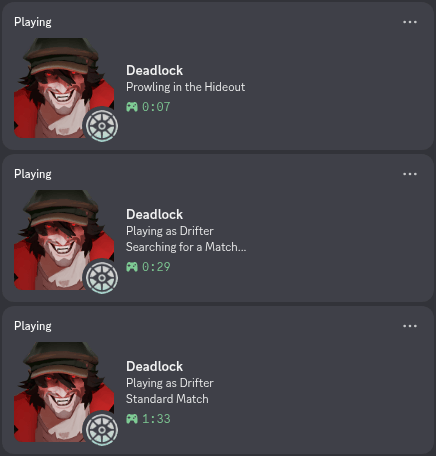
Automatically shows your hero, match state, and game mode on your Discord profile. Native Rust binary, no runtime, no bloat.
Why choose Deadlock RPC
Built for performance and flexibility, not just for show
Read-only, VAC safe
Read-only with respect to the game. No game memory access, no injected code, no modifications to game files. Safe by design and fully auditable.
Three hero portrait styles
Choose between normal, gloat (celebration crop), or critical (combat crop) art styles for your Discord Deadlock presence card.
Auto-launch and auto-exit
Run Deadlock RPC once. It launches Deadlock for you and shuts itself down automatically when you close the game.
Statlocker.gg integration
Add a clickable button to your presence so others can view your Deadlock match history on Statlocker.gg directly from Discord.
Deeply customizable
Control every line of presence text, toggle the timer, and configure every option through config.toml. No reinstall needed.
Native Rust binary
No Python interpreter, no Node.js runtime, no antivirus false positives. A single self-contained executable that starts instantly.
How Deadlock Discord Rich Presence works
Three steps from download to live Discord status
Download and extract
Grab the zip for Windows or Linux from the Releases page and extract it anywhere on your system.
Run Deadlock RPC
Launch the executable. It starts Deadlock with -condebug, then monitors the game log for hero and state changes in real time.
Discord updates live
Your hero name, portrait, match mode, and game phase automatically appear and update on your Discord profile as you play.
Common questions about Deadlock Discord presence
Quick answers (full FAQ)
Is Deadlock RPC safe? Will I get VAC banned?
Yes, it is safe. Deadlock RPC only reads the game log file and never touches game memory, injects code, or modifies any files. VAC targets memory manipulation, not log readers. The source code is fully open for inspection.
Does Deadlock Discord Rich Presence work on Linux?
Yes. Pre-built Linux x86_64 binaries are on the Releases page alongside the Windows builds. Both platforms are actively tested.
How do I customize my Deadlock Discord status?
Edit config.toml next to the executable. Change any presence text, toggle the timer, switch hero portrait styles, or enable the Statlocker button. Changes apply on the next launch.
Show your hero on Discord
Free, open source, actively maintained. 11+ releases and counting.